

What is Library Automation?
Library Automation is using computers and software to do Library work of doing everything by hand. Before libraries used papers, cards and files to keep track of things. Now computers do things like issue and return books keep track of books keep member records and even help people search for things online.
In words Library Automation makes Library work go faster it makes fewer mistakes and it does not need as much paper work as before. Library Automation is really good for the Library because it helps the Library do things better. Library Automation is very useful, for the Library.
Why Library Automation Matters
From a student perspective, manual libraries feel slow and confusing. Finding a book can take too much time, and sometimes records are not updated properly.
Automation solves this problem:
- You can search books in seconds
- Issue and return becomes quick
- No confusion about availability
- Records stay safe and organized
But one important point: automation is not just about installing software. Many libraries fail because they focus only on tools, not on proper system setup and training. Without planning, automation becomes messy.
So, automation is useful only when it is done in a structured way.
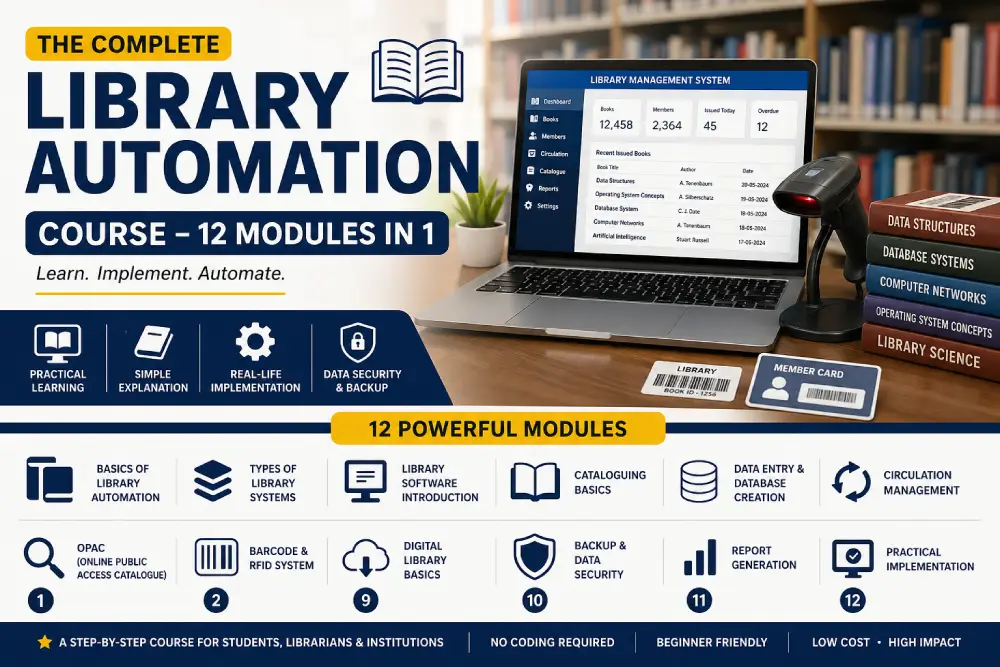
Library Automation Course (12 Modules) – Complete Beginner Guide
What You’ll Learn in This Course
This course is designed in 12 modules, covering both theory and practical understanding.
1. Basics of Library Automation
Understanding concepts, need, and scope
2. Types of Library Systems
Manual vs automated vs digital libraries
3. Library Software Introduction
Overview of tools like LMS (Library Management System)
4. Cataloguing Basics
How books are recorded and classified
5. Data Entry & Database Creation
Creating records for books and users
6. Circulation Management
Issue, return, fine calculation system
7. OPAC (Online Public Access Catalogue)
How users search books online
8. Barcode & RFID System
Tracking books using technology
9. Digital Library Basics
E-books, PDFs, and online resources
10. Backup & Data Security
Protecting records from loss
11. Report Generation
Monthly reports, usage reports
12. Practical Implementation
Setting up a basic automated library system
This Course Includes
- Step-by-step explanation in simple language
- Real-life examples from Indian libraries
- Practical understanding, not just theory
- Focus on low-cost solutions (important for small libraries)
- Clear idea of mistakes to avoid
Course Content (Detailed Flow)
The course starts from zero level, assuming the learner has no prior knowledge. It gradually moves towards practical setup.
- First, it builds basic understanding
- Then it introduces tools and systems
- After that, it focuses on real implementation
- Finally, it explains maintenance and problem handling
This structure is important because many courses directly jump into software without explaining the base. That creates confusion.
Strong Observation
Many institutions think buying expensive software = automation done.
This is wrong.
Real automation depends on:
- Proper data structure
- Consistent record entry
- Staff training
- Regular updates
Without these, even the best software will fail.
So, the focus should be on system thinking, not just tools.
Who Should Learn This?
- Library science students
- School/college librarians
- Small institute owners
- Anyone managing books or records
Even if someone is not from a technical background, this course can be understood easily.
Library Automation Course Duration in 2026
Course duration depends on your learning goal.
1. Short-Term Certificate Course
Duration: 1 week to 3 months
Best for:
- Beginners
- Students
- Freshers
What you learn:
- Basics of Koha
- Installation
- Cataloging
- Barcode creation
- Circulation system
Good for starting.
2. Advanced Certificate Course
Duration: 3 to 6 months
Best for:
- Library professionals
- Working librarians
What you learn:
- Advanced Koha
- DSpace
- Data migration
- Report building
- User management
Better practical knowledge.
Some institutes in India are offering 3-month and 6-month structured programs in 2026.
3. PG Diploma in Library Automation
Duration: 1 year
Best for:
- Graduates in Library Science
- Professional specialization
This is deeper learning.
Universities like Indira Gandhi National Open University and Pondicherry University offer diploma-level programs.
Library Automation Course Fees in 2026
Fees depend on the institute and course type.
| Course Type | Duration | Average Fees |
| Basic Certificate | 1 week–3 months | ₹6,999 |
| Advanced Certificate | 3–6 months | ₹10,000 – ₹20,000 |
| PG Diploma | 1 year | ₹18,000 – ₹25,000 |
| University Degree Add-on | 6 months–1 year | ₹10,000 – ₹40,000 |
Example:
A 3-month Koha course in 2026 is available around ₹6,999, while advanced 6-month programs are around ₹10,000.
IGNOU’s PG Diploma fee is around ₹18,700 in 2026.
Which Library Software Should You Learn?
In my opinion, students should not learn only theory.
Focus on practical software:
Koha
Most popular open-source library software.
Used for:
- Cataloging
- Circulation
- Reports
DSpace
Used for digital repositories.
Best for colleges and universities.
RFID Systems
Used in bigger libraries.
Helps in fast issue-return.
OPAC
Helps users search books online.
Important practical skill.
Who Should Join a Library Automation Course?
This course is useful for:
- B.Lib students
- M.Lib students
- Working librarians
- School library staff
- College library assistants
- Research scholars
If you want practical library work, this skill matters.
Final Thoughts
Library automation is no longer optional. Even small libraries need it to stay relevant. But it should be done in a practical and planned way.
This course tries to explain things in a simple, grounded manner without making it sound complicated.
FAQs
1. Is library automation difficult to learn?
No. If explained step by step, it is easy. The main challenge is understanding the system, not the software.
2. Do I need coding knowledge?
No coding is required. Basic computer knowledge is enough.
3. Which software is used in library automation?
There are many options like Koha, SOUL, and other LMS tools. Choice depends on budget and need.
4. Can small libraries also use automation?
Yes. Even a small setup with basic software can improve efficiency a lot.
5. What is the biggest mistake in automation?
Starting without planning data structure and not training staff properly.